What's Included
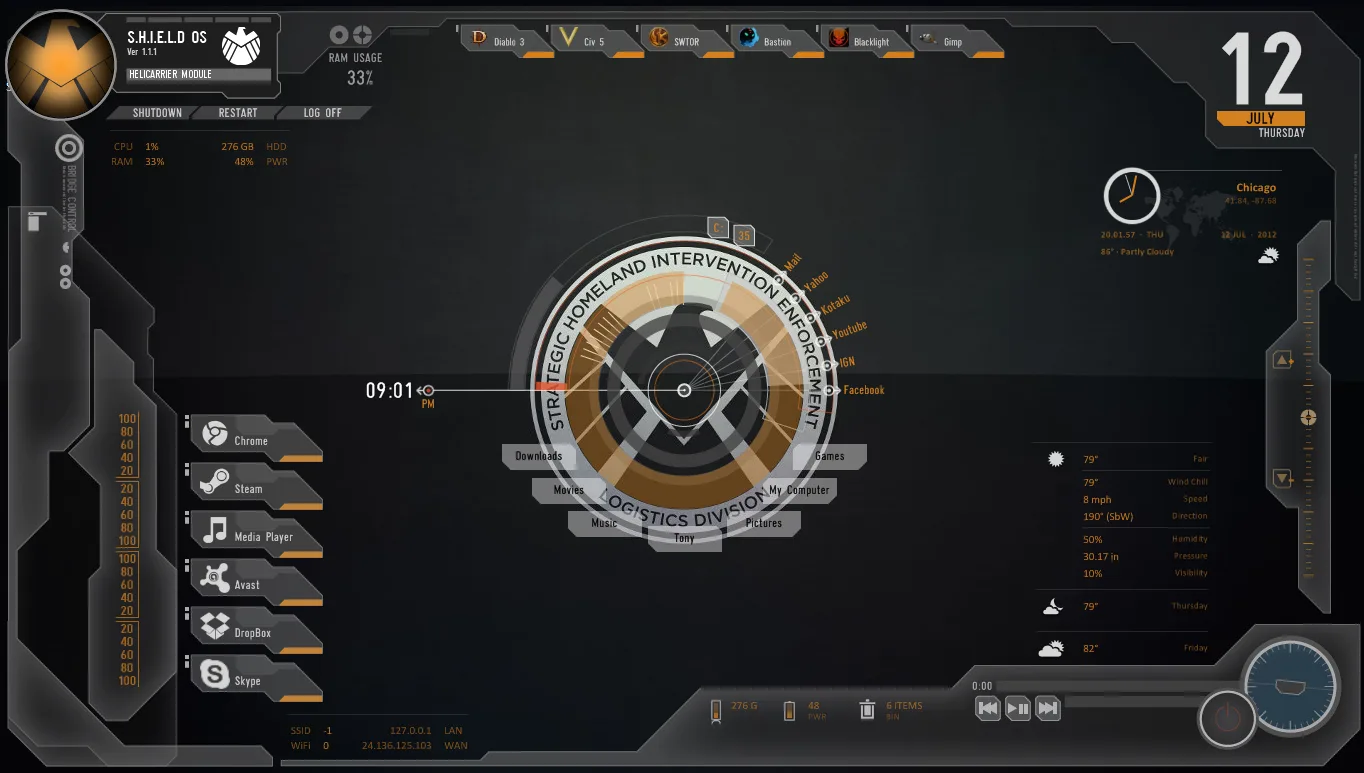
- Avengers SHIELD launcher panel – a main control area with a central SHIELD‑style button; clicking it toggles the visibility of most other skins in the suite.
- Icon and label launchers – simplified launcher buttons that can be set to open your own apps, folders, or bookmarks (configuration instructions are linked from the original Daelnz page).
- Border and frame elements – screen‑edge borders and frames that tie the layout together, styled to match the original Avengers OS design.
- Personal icon and text tweaks – the modder changed some icons and the LLT/SLT text labels, giving a slightly customized look while keeping the core layout intact.
Who Is This Skin For?
This skin suits Marvel fans and gamers in the USA who enjoy immersive desktop themes, especially if they like the SHIELD or Iron Man style. It also works well for visual‑oriented users who want a complete, unified desktop setup instead of a collection of mismatched widgets.Requirements
- Rainmeter: Version not specified by the author.
- OS: Windows 10 / Windows 11
- Plugins: Not specified by the author.
How to Install
- Download the skin from DeviantArt
- Open the .rmskin file
- Click install
- Load the skin from Rainmeter
Tip: If the SHIELD button does not hide all skins, check that the Border config files include the line Group=Avengers under the [Rainmeter] section, as mentioned in the author’s notes.
About the Author
Oni3298 is a DeviantArt creator who tweaks and repackages existing Rainmeter suites, often adding small visual changes and better integration with other skins. Their work focuses on clean, themed desktop layouts that feel cohesive and polished without completely rebuilding the original design.View the original release and more work: Avengers SHIELD OS Skin – Modified v1.4 by Oni3298 on DeviantArt